๐ŸŽ‰ Censr Stream is live โ€” go live to Twitch without OBS, and every secret on your screen is hidden automatically. Get the free trial โ†’
Built with Twitch & YouTube's rules in mind

One leaked frame can cost you your channel.

A password. A DM. Your home address. A card number. One notification or one wrong tab, live in front of everyone, and it's already saved in a clip. That's how creators get hacked, doxxed, and banned. Censr is the safety net that catches it before your audience ever sees it. Go live straight to Twitch, no OBS, and everything sensitive on your screen gets blacked out first. 100% on your Mac, nothing uploaded.

Protect your stream, free for 14 days โ†’ // no card up front ยท then $29 (or $19 for the first 100 founding members)
fake.env โ€” your screen, live LIVE 0 hidden
STOP PROTECTING // scanned & sealed on your Mac, before a frame airs
100% on-deviceโ–ฎ Stream to Twitch โ€” no OBSโ–ฎ Or a camera in OBS ยท Zoom ยท Meetโ–ฎ Mac-first
Why risk it

Why go live without protection?

You spent years building your channel. One careless frame can end it. Censr was built with Twitch and YouTube's own rules in mind, so a slip stays a non-event instead of a suspension.

Get hacked

A token or password on screen for two seconds is all it takes. Someone runs up your cloud bill, or walks off with your channel.

Get banned

Showing a viewer's private info, a home address, or a card number breaks the platforms' rules. That's a suspension, not just a bad clip.

Get doxxed

Your own address, email, or real name flashed on stream, saved and shared before you ever notice. You can't un-air it.

Censr is the layer between "one slip" and "it's already a clip." It watches your whole screen, seals anything sensitive before it airs, and hands you a panic key for the moment you need it most.

Who it's for

If you go live, Censr has your back.

DevelopersLIVE NOW

Stream your code with keys, passwords, .env & tokens auto-hidden โ€” no OBS needed. Mixer, facecam & chat overlay built in.

GamersCOMING

Accidental NSFW, bad links & wrong tabs โ€” stay un-bannable on Twitch & YouTube.

IRL / Just ChattingCOMING

Bystanders' faces, addresses & documents caught on camera.

Teams & businessCOMING

Client PII & financials on Zoom / Teams screen-shares.

// v1 protects secrets & PII today โ€” the rest is on the roadmap below.

Why Censr

Browser extensions can't see your terminal.

Every other "blur my screen" tool only works inside a Chrome tab. But you don't leak secrets in a browser โ€” you leak them in your terminal, your editor, your .env file, a database GUI. Censr watches all of it, because it works at the system level, not inside one app.

What it does

A whole streaming setup โ€” that can't leak.

Go live without OBS

Stream your protected screen straight to Twitch (or YouTube / any RTMP) with one click. No OBS, no scene-wiring โ€” everything Censr hides is hidden on the live stream too.

Everything on screen, sealed

API keys, passwords, .env, tokens & PII across your terminal, editor, database GUIs and native apps โ€” blacked out before a single frame airs.

Your whole studio

A built-in audio mixer (your mic + desktop/game audio, with live levels), a drag-and-place facecam, and a chat overlay โ€” right on the feed, no extra tools.

Works with pro audio gear

Streams smoothly from pro USB or Thunderbolt audio interfaces โ€” Apollo Twin and the like. If you run real audio gear, it just works โ€” no fiddling, no workarounds.

Switch it up, mid-stream

Change your mic or audio interface, or swap what's on screen โ€” live, without ever dropping the stream. Redact just one window the moment your workflow changes.

Sign in once

Connect Twitch one time. Censr stays signed in across restarts and remembers your stream title and category โ€” so going live again is a button, not a setup ritual.

Safe chat, built in

Read your Twitch chat inside Censr, with a safety lens that flags risky links so doxxing and TOS-bait don't slip past. Set your title & category without leaving.

Panic button

One hotkey โ€” โŒ˜โ‡งB โ€” instantly blacks out everything, even mid-stream from another app. Your last line of defense.

Zero-leak safety buffer

Your feed runs a beat behind real time, so a freshly-typed key is scanned and sealed before a single frame ever airs.

100% on-device

Detection runs on your Mac with Apple's on-device engine. Your screen never leaves your machine. No cloud, no logs.

Works in OBS & Zoom too

Prefer your current setup? Censr is also a virtual camera in OBS, Zoom, Meet, Teams & Discord โ€” same protection, drops right in.

How it works

Stream your code. Not your secrets.

Capture, detect, seal. Three steps, all on your Mac, in the beat it takes a frame to reach your audience.

Capture

Censr reads the window or screen you're sharing, privately and on-device, and feeds a clean copy to your Twitch stream (or its virtual camera for OBS/Zoom).

Detect

It recognizes API keys, tokens, passwords, .env values and personal info the instant they appear on screen.

Seal

A safety buffer holds the feed a beat, so every secret is blacked out before it reaches your audience.

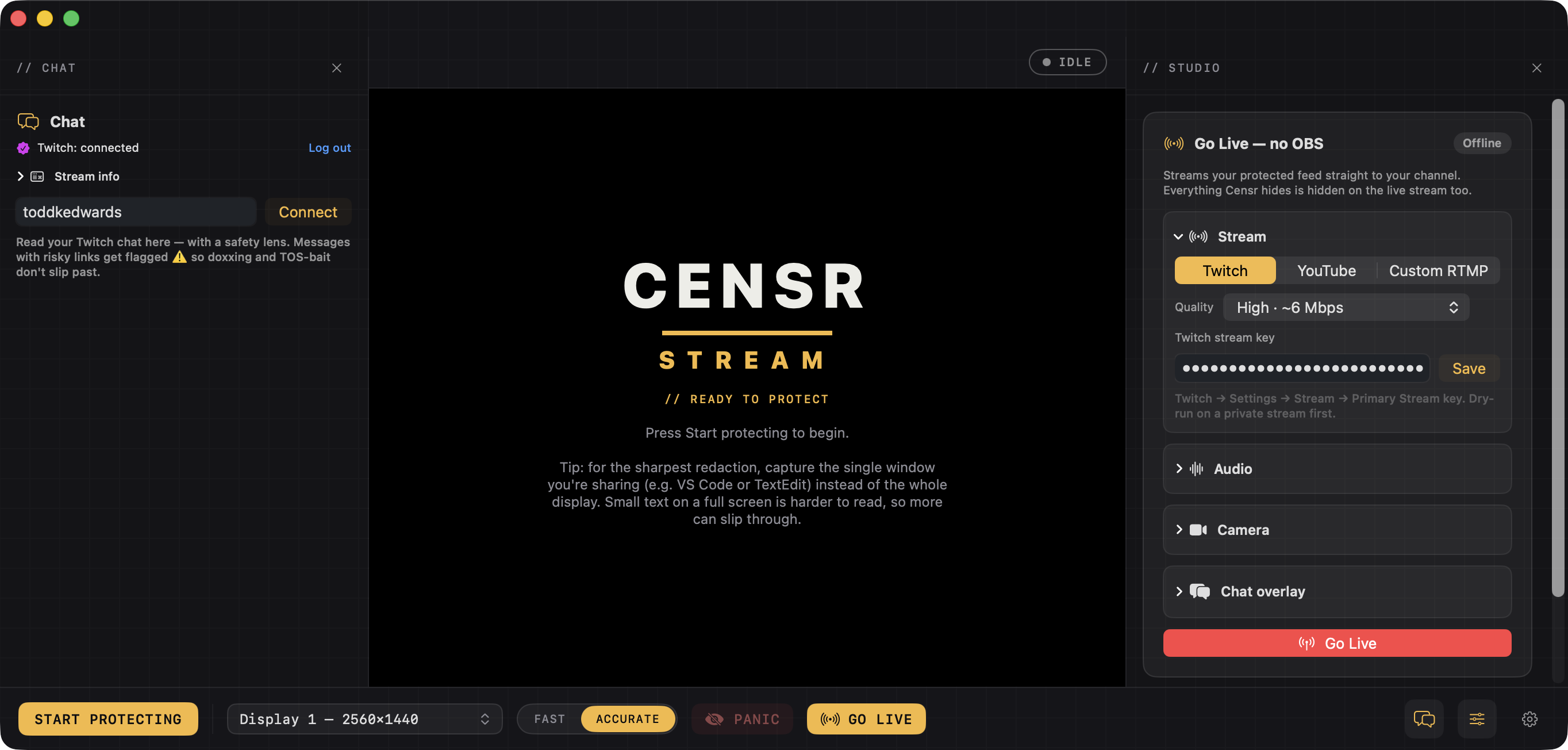
The Censr Stream cockpit โ€” Twitch chat with a safety lens on the left, the protected preview in the center, and the Studio panel on the right with Go Live (no OBS), audio mixer, camera and chat overlay controls, plus a Start Protecting / Panic / Go Live toolbar.
// the cockpit, your chat, protected preview and the whole studio in one window
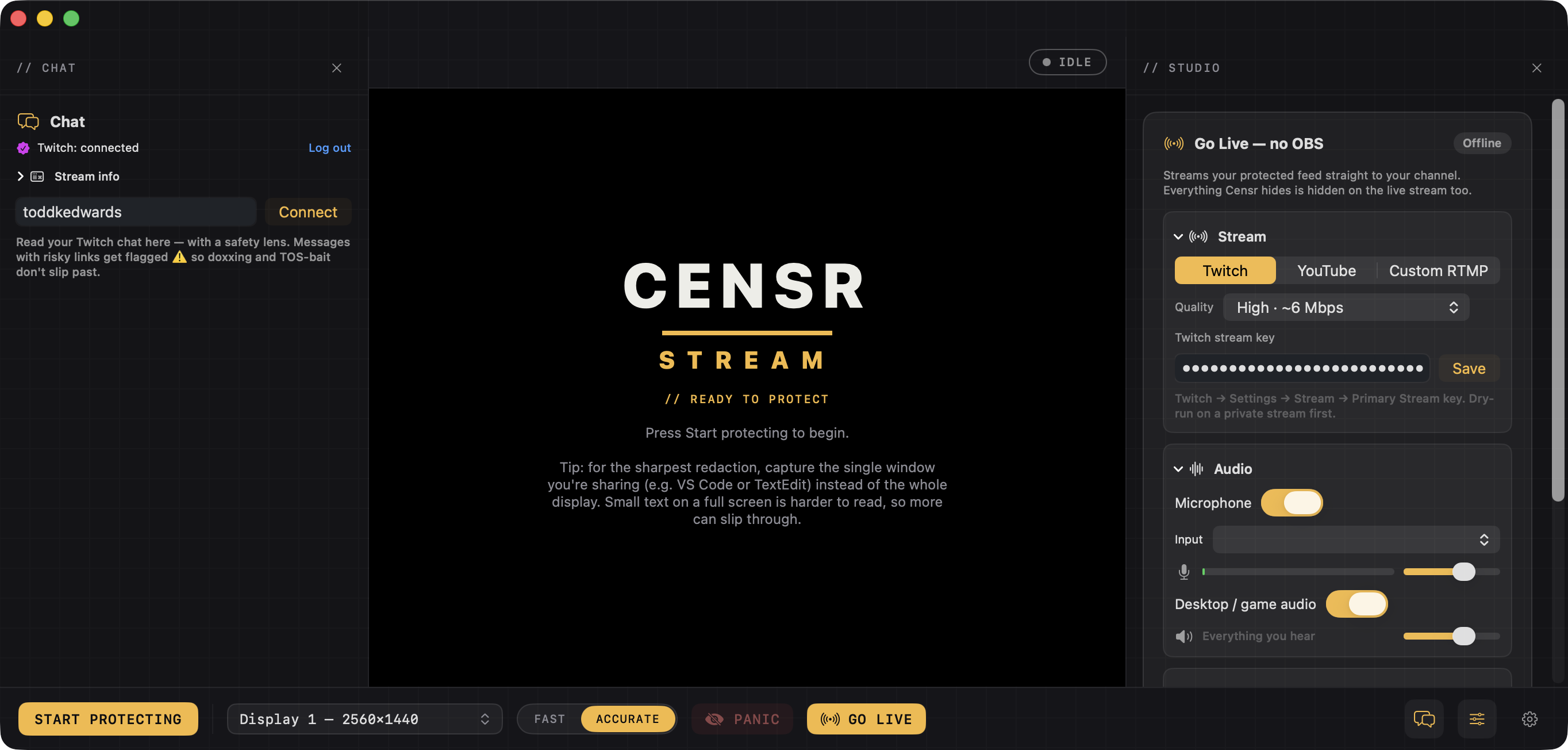
Censr Stream's Studio panel with the audio mixer open โ€” microphone toggle, input-device picker, a live level meter and volume, plus desktop/game audio with its own slider โ€” all built in, no extra tools.
// the built-in mixer, your mic plus game audio with live levels
On-device by design

Your screen never leaves your Mac.

A tool that watches your secrets has to be trustworthy about its own. So here's exactly how Censr handles your screen โ€” and what it won't promise.

Detection runs locallyOCR and secret-detection happen on your Mac with Apple's on-device engine. Your screen content is never uploaded, streamed to us, or stored anywhere off your machine.
No account, no cloud, no telemetry on your screenYou don't sign in to use it. Censr doesn't phone home with what's on your display. There are no server logs of your screen, because nothing leaves the device.
Honest about the limits โ€” defense in depth, not a guaranteeNo detector catches 100% of everything. That's why Censr runs a safety buffer (so secrets seal before they air) and gives you a panic key and an always-blur list. We'll never claim "100% safe" โ€” we'll give you layers.
Founding price

One-time. Yours forever.

Buy it once โ€” no subscription. The price rises as new protection ships, but whatever you pay today is locked in for good.

Launch price ยท for a limited time
$39 $29 one-time

Censr for Mac ยท 14-day free trial, no card up front

๐Ÿ”’ First 100 founding members get it for $19 โ€” then it's $29 (rising to $39 as Pro features ship). Claim the $19 founding price โ†’
  • Go live to Twitch โ€” no OBS (mixer, facecam, chat overlay)
  • System-wide secret & PII redaction
  • Safe Twitch chat viewer + clip-to-Shorts
  • Also a virtual camera for OBS, Zoom, Meet & Discord
  • Zero-leak buffer, always-blur & panic hotkey
  • 100% on-device โ€” nothing ever uploaded
  • Free updates within v1
Download free โ€” 14-day trial โ†’
or buy a license now โ€” $29 โ†’

// 14-day free trial, no card up front ยท then a one-time purchase ยท backed by a money-back guarantee ยท powered by Lemon Squeezy ยท macOS 14+ (Apple Silicon & Intel)

Where Censr is headed

v1 is the start, not the finish.

One solid piece at a time โ€” built right, not rushed. No hard dates, but here's the order.

Now โ€” Mac โ— shipping

Full solo streaming โ€” go live to Twitch (no OBS) with a mixer, facecam & chat overlay, while secrets & PII are auto-hidden. Also a virtual camera, panic key, 100% on-device.

Next โ€” Nudity & โ€œdon't-get-bannedโ€ protection โ— in development

Catches accidental NSFW & bad sites before they air. Unlocks gamers & IRL. First pieces are being built and tested right now.

Next โ€” Live Guard

Forgot you're still live? Step away and Censr blacks out the feed automatically โ€” so nothing airs while you're gone.

Then โ€” Screenshot redaction

Drop a screenshot on Censr, get a share-safe copy back โ€” same engine, one frame at a time. For Slack, bug reports & social.

Then โ€” Windows

For the gaming crowd, on the platform they actually stream from.

Later โ€” Faces & doxxing ยท Teams / meeting mode

IRL privacy + business screen-share protection.

On Windows?

You're not forgotten.

Censr is Mac-first while we get it perfect. Windows is on the roadmap โ€” add your email and you'll be first in line. The bigger this list, the sooner we build it.

FAQ

The honest answers.

Does my screen get uploaded anywhere?
No. All capture, OCR, and detection run locally on your Mac using Apple's on-device engine. Your screen content never leaves your machine โ€” there's no cloud, no account, and no log of what's on your display.
What does Censr actually catch?
API keys and tokens (OpenAI, Anthropic, AWS, Stripe, GitHub, Google, Slack, JWTs, private keys), .env values, password fields, strong-password-shaped tokens, and common PII like emails, SSNs and card numbers โ€” by pattern, the instant they appear. Anything else, you add to your Always-Blur list and it's sealed everywhere it shows up.
Is it a 100% guarantee?
No โ€” and we'll never claim that. No detector is perfect. Censr is built as defense in depth: a safety buffer seals secrets before they air, a panic hotkey blacks everything out instantly, and the always-blur list covers anything pattern-matching can't. Honest beats sorry.
Will this keep me from getting banned or hacked?
That's what it's built for. Showing a viewer's private info, a card number, or your own address can break Twitch and YouTube's rules, and a leaked token or password can get your account stolen. Censr seals those before they ever air, so a slip stays a non-event instead of a suspension. It's a strong safety layer, not a magic shield, which is why we pair it with the panic key and always-blur list and stay honest that no tool catches everything.
Do I need OBS?
No. Censr streams straight to Twitch (or YouTube / any RTMP) on its own โ€” with your mic, desktop/game audio, camera and chat overlay built in. Just paste your stream key and hit Go Live. Prefer OBS? See the next answer โ€” it works there too.
Does it work with OBS, Zoom, and Meet?
Yes. Censr also installs a virtual camera, so it appears as a camera/source in OBS, Zoom, Meet, Teams, and Discord. Pick "Censr" as your source and your redacted screen is what the audience sees. Use it standalone or inside your current setup โ€” same protection either way.
Is it really Mac only?
For now, yes โ€” v1 is Mac (macOS 14+, Apple Silicon and Intel). Windows is on the roadmap; add your email to the Windows list above and you'll be first to know.
How does the free trial and pricing work?
Download free and use Censr fully for 14 days โ€” no card up front. To keep going it's a one-time purchase (no subscription): $29, and the first 100 founding members get it for $19 with code EARLYBIRD. The price rises as new protection ships, but whatever you pay is locked in for good โ€” and every purchase is backed by a money-back guarantee.
What if it doesn't work for me?
Email me and we'll make it right. Censr is built by one developer who streams behind it โ€” your feedback goes straight to the person who can fix it.
Get Censr

Don't bet your channel on being careful.

One frame is all it takes. Censr seals your secrets, messages and personal info before they ever hit your stream, so a slip never becomes a ban. Free for 14 days, no card up front, then a one-time purchase ($19 for the first 100 founding members).